The First Full-Desktop E-Reader & Eye Care Suite for Windows
Turn every PDF viewer, browser tab, Word document, and code editor into a calm paper-like reading surface — with zero-lag Reading Ruler, Spotlight Focus, 22 reading palettes, Deep Crimson 0K, hardware cursor tinting, 1% flicker-free dimming, and 20-20-20 break protection.
EyeGuard v3.1.0 Showcase (1600×900): 0K Zero-Blue Darkroom, Deep Crimson, Cursor Tinting, Zero-Lag Reading Ruler (Ctrl+Alt+F), 22 Palettes, Circadian Solar Curve & 4-Mode Breaks.
Built for Deep Reading & Long Screen Sessions
Kindle and Xodo styles stay trapped inside their own viewer. EyeGuard applies across your entire Windows desktop.
Digital Reading Ruler
A translucent cursor-tracking focus slit (60px–700px) that keeps your gaze locked on the current paragraph while softly shading distraction around it.
Paragraph Spotlight Mask
Dims sidebars, notifications, and clutter across your whole desktop while illuminating only your active reading block.
Paper, E-Ink & Sepia Themes
Kindle Paperwhite tint, Warm Sepia, Night Contrast, Terminal Slate, 15 Xodo Pro themes, plus full custom color rules per application.
Zero-Flicker 1% Dimming
Calibrated luminance down to 1% with zero PWM flicker, pure zero-blue/green Deep Crimson (Ruby+), hardware cursor tinting, and a 3-stage circadian curve.
Idle-Aware Break Engine
Gentle break prompts, guided breathing micro-rests, and optional strict rest mode — pausing automatically when you step away.
Fail-Safe Gamma Recovery
An isolated Win32 watchdog restores native hardware display gamma in under 200ms if anything unexpectedly closes or crashes.
Try EyeGuard Reading Surfaces
Switch presets below to preview how harsh white documents transform into restful reading tones across Chrome, Acrobat, Word, and VS Code.
Clinical Reading Comfort — Page 14
Prolonged exposure to high-luminance RGB white backgrounds accelerates tear-film evaporation and visual fatigue. Applying a calibrated low-glare surface reduces contrast harshness without distorting text legibility during multi-hour study sessions.
Experience 0K Darkroom & 1% Dimming
Slide from crisp 6500K daylight down through warm amber to pure 0K Zero-Blue Darkroom, or enable Deep Crimson (Ruby+) to preview white-glare suppression.
Live Document Glare Test
Standard monitors clip around 30%–40% hardware brightness and bottom out at orange amber. EyeGuard scales down cleanly to 0K zero-blue/green and 1% software brightness with zero PWM backlight flicker.
Live Videos Over Real Windows Documents
Unedited desktop recordings showing EyeGuard transforming bright PDFs and active windows in real time.
Inside EyeGuard v3.1.0
Authentic Windows captures across every core module — zero mockups, zero telemetry.
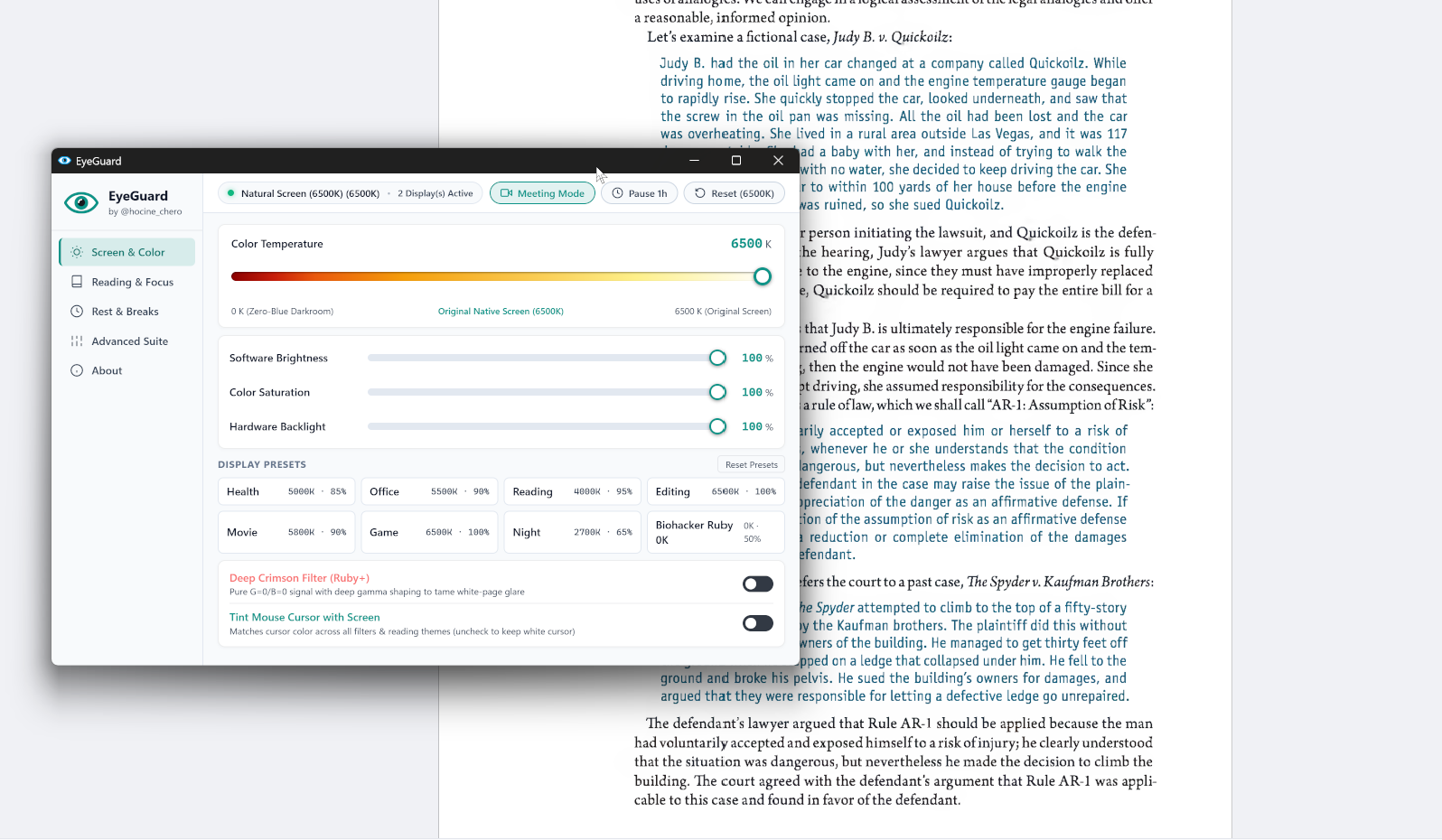
Screen & Color Center: 0K Zero-Blue Darkroom scale, Biohacker Ruby 0K, Deep Crimson (Ruby+), and Tint Mouse Cursor toggles over a real PDF.
How EyeGuard Compares
Why pay $20/year or settle for simple orange tinting when you can own the full stack free under MIT?
| Capability | Windows Night Light | f.lux | CareUEyes (Paid) | EyeGuard (v3.1.0) |
|---|---|---|---|---|
| True 0K Zero-Blue Darkroom & Deep Crimson | No | No (1200K min) | No (2000K min) | Yes (0K Pure Red + Cursor Tinting) |
| Line-by-Line Reading Ruler | No | No | $20/yr | Yes (Zero-Lag Tracking) |
| Paragraph Spotlight Focus Mask | No | No | No | Yes (Custom Size & Opacity) |
| Kindle / E-Ink / Sepia Desktop Themes | No | No | No | Yes (22 Palettes + Picker) |
| Ultra-Deep Dimming (Down to 1%) | No | No | $20/yr | Yes (Zero PWM Flicker) |
| 20-20-20 Break Timer + Away Sensing | No | No | $20/yr | Yes (4 Modes: Gentle, Centered Card, Full, Strict) |
| Fail-Safe Gamma Crash Watchdog | No | Can stick | Can stick | Yes (<200ms Auto-Restore) |
| License & Telemetry | Proprietary Telemetry | Closed Source | $20/year | 100% Free MIT • Zero Network Calls |
Verified Clean & Zero-Telemetry Transparency
Compiled directly to native C/C++ machine code via Nuitka. Every release asset is openly verifiable with published SHA-256 checksums on GitHub Releases.